A typical card on a WordPress site has a picture, a heading, a couple of lines of text and a “Read more” button. People click on whatever part of it they see first, often the picture. Only the heading and the button open the page, so a lot of those clicks do nothing.
The block editor has no setting that turns a whole card into a link. You can still do it, with a few lines of CSS or with a plugin.
The short version
- Group, Column and Cover blocks have no link setting in WordPress.
- Without a plugin: link the heading, add a CSS class to the card and stretch the heading’s link over the card with CSS.
- Don’t wrap the card in a link inside a Custom HTML block, and don’t make it clickable with JavaScript.
- With a plugin: set the link on the block itself, from the block toolbar.
Why WordPress can’t link a whole block
In the block editor you can link text, a button or an image. Cards are usually built from a Group, Column or Cover block, and none of them has a link setting. The Group block does have a link color setting, but it only changes the color of the links inside it.
In a Query Loop you can link the post title (“Make title a link” in the Post Title block) and the featured image (“Link to post” in the Post Featured Image block). The excerpt, the date and the space around them still don’t open the post.
Option 1: stretch the heading’s link with CSS
Developers have a standard trick for this called a stretched link. The heading keeps its link, and CSS makes the link’s clickable area as big as the card.
- Link the card’s heading to the page the card should open. In a Query Loop, turn on “Make title a link” in the Post Title block.
- Select the block that makes up the card (the Group, Column or Cover around the heading). If the heading is selected, click “Select parent block” in the toolbar. In the block settings, open Advanced and enter
card-linkin “Additional CSS class(es)”. - Add the CSS below. In a block theme, go to Appearance > Editor > Styles, open the three-dot menu in the Styles panel and choose Additional CSS. In a classic theme it’s Appearance > Customize > Additional CSS.
.card-link {
  position: relative;
}
.card-link :is(h2, h3, h4) a::after {
  content: "";
  position: absolute;
  inset: 0;
}
.card-link a:not(:is(h2, h3, h4) a) {
  position: relative;
  z-index: 1;
}
The second rule stretches the heading’s link over the card. The third puts the card’s other links and buttons on top of the stretched link. Leave it out and those links stop working, because every click lands on the heading’s link.
The downsides of doing it with CSS
- The stretched link only covers the nearest block that has its own CSS positioning, and some core blocks have it by default. In a Cover block that’s the text area in the middle, so clicks on the rest of the picture do nothing. The same happens when the heading sits in a Group inside the card and that Group has “Inner blocks use content width” turned on.
- The CSS sits in the theme settings, and the card only carries a class name. Someone editing the page a year later has no way to tell what
card-linkdoes. Additional CSS is also saved per theme, so it stops working when you switch themes. - When keyboard users tab to the card, the focus outline only goes around the heading.
- You can’t select the card’s text by dragging the mouse. That’s the case with any stretched link.
Two quick fixes to avoid
A link around the card in Custom HTML
You can paste the card’s HTML into a Custom HTML block and wrap it in an <a> tag. After that, changing the card means editing HTML. If the card also has a button or another link, you end up with a link inside a link, which isn’t valid HTML. Browsers close the outer link where the inner one starts, so the rest of the card is no longer part of it.
A click handler in JavaScript
A script that opens the page on click feels the same with a mouse, but there’s no link on the page. Middle-click and Ctrl or Cmd-click don’t open a new tab, the right-click menu has no “Open link in new tab”, and search engines have nothing to follow. Keyboard users can’t tab to the card either, unless someone writes more code for that.
Option 2: add the link to the block with a plugin
Several plugins in the WordPress plugin directory add the missing link setting to these blocks. The link is then stored in the card itself, and nobody needs to know about a CSS class.
Ours is Wholelink. It works on the same idea as Option 1, a link stretched over the card, but the plugin adds it for you and it also works on Cover blocks. It’s free on wordpress.org.
- Select the Group, Column or Cover block and click “Link whole block” in its toolbar.
- Pick a page or post, or paste a URL. It’s the same link box as the Button block, with options to open the link in a new tab or mark it nofollow or sponsored.
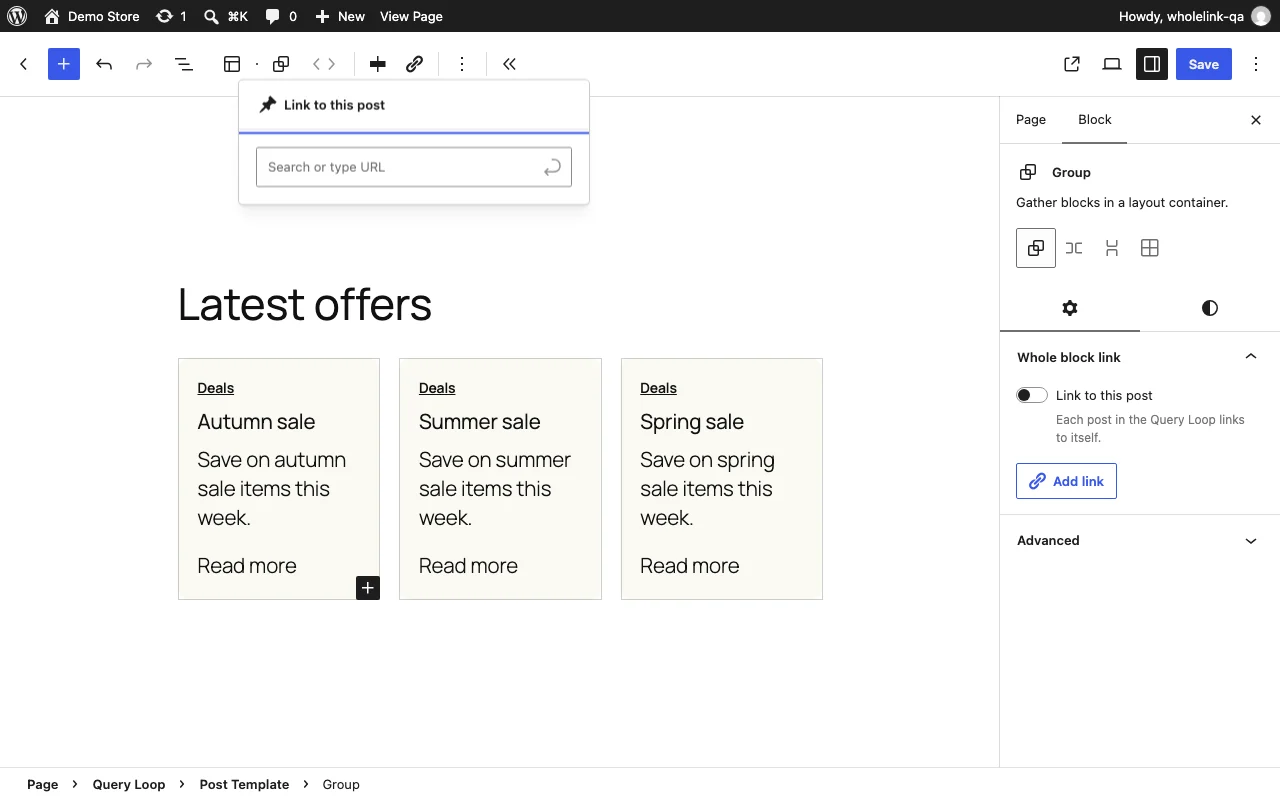
In a Query Loop, pick “Link to this post” and every card links to its own post. The block settings then show the link under “Whole block link”. The “Link label” field there is what screen readers announce. If it’s empty, they read the post title in a Query Loop, otherwise the card’s first heading, or the start of its text when there’s no heading.
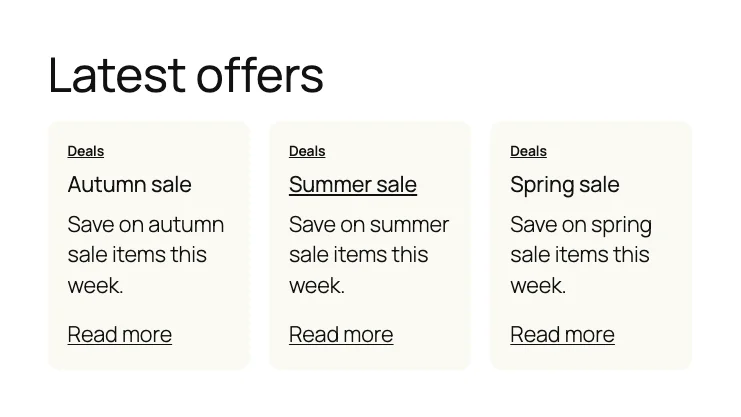
Links, buttons and form fields inside the card keep working. A linked Cover block opens the page from anywhere on the picture. The plugin adds no JavaScript to the site, and its stylesheet only loads on pages that have a linked block.
Check that it worked
Open the page in a private window and try the card the way a visitor would.
- Click the picture and the empty space. Both should open the page.
- Ctrl or Cmd-click the card. The page should open in a new tab.
- Tab to the card and press Enter. The page should open.
- Click the other links and buttons in the card. Each should open its own page.
Which option to choose
- A handful of cards, and someone who knows CSS looks after the site. The CSS from Option 1 does the job.
- Cover blocks, or a site that people edit without touching CSS. Use a plugin, so the link stays on the block where the next person will find it.
Questions people ask
Is a clickable card bad for SEO?
No, as long as it’s a real link. Search engines follow the address in a link whether the link covers a word or a whole card. A card that opens on a JavaScript click has no address for them to follow.
What do screen readers say for a clickable card?
Whatever the link’s text is. With the CSS from Option 1 it’s the heading. With Wholelink it’s the Link label. Without one it’s the post title in a Query Loop, otherwise the card’s first heading or the start of its text. Keep the label short and make it say where the link goes, for example the title of that page.
Can I link a Columns block or a Media & Text block?
Wholelink links each Column on its own. It can’t link the Columns block around them, and it doesn’t support Media & Text. Move the content into a Group and link the Group.
What happens if I turn the plugin off?
The blocks stay valid and the cards stop being links. Turn the plugin back on and the links come back, unless the page was saved in the editor while the plugin was off.
One card, one link
Once the whole card opens the page, the “Read more” button inside it goes to the same place. With a mouse that does no harm. With a keyboard you tab to the card, then to the button, and both take you to the same page. A screen reader reads both links too.
So after you link a card, look at what’s left inside it. Keep the links that go somewhere the card doesn’t, like a category or a contact page. Remove the “Read more” button, or keep the words as plain text if the design needs them. Each card then has one link, and keyboard users tab to it once.
WordPress plugin, free on wordpress.org
Wholelink
Makes a whole Group, Column or Cover block one link, so visitors can click anywhere on a card. Links and buttons inside keep working, and Query Loop cards each link to their own post.
More in Guides
How to replace a PDF in WordPress and keep the same URL
Uploading a new PDF to WordPress gives it a new address and breaks the links you already sent. How to replace the file and keep the same URL.
Stripe says paid, WooCommerce says cancelled: how to find and fix those orders
WooCommerce cancelled an order Stripe shows as paid? Why "Unpaid order cancelled – time limit reached" happens and how to find and fix each affected order.